

HR software that already speaks government.
Personal Data Sheet. Plantilla and PSIPOP. CSC leave credits and monetisation. GSIS, PhilHealth, Pag-IBIG and PERA on every payslip. BIR 2316 and the 1604-C alphalist. Built around the forms your office actually files, not around a generic HRIS with a Philippines checkbox.
Runs on your agency’s own servers. Employee data never leaves the building.
If you are the one signing for it rather than running it, your section is below.
If you have ever assembled a 201 file by hand, this was built for you.
The PDS you retype every time
The CS Form 212 entered once — all eight sections, the Q34–40 disclosures, eligibilities, family background, voluntary work. Every employee reads and prints their own, and it prints as a four-page form a CSC reviewer recognises.
How it worksThe plantilla that lives in a spreadsheet
Funded positions as a real register: item number, salary grade, step, authorised salary, incumbent, and Qualification Standards. Filled and vacant roll up per office.
How it worksThe year-end filings you rebuild in Excel
BIR 2316 per employee and the 1604-C alphalist as a spreadsheet and a .DAT file, aggregated from the payroll you already ran. The filing and the payroll cannot disagree.
How it worksA payslip that reads right to someone who has checked ten thousand of them.
PERA is on it. The contributions are the government ones at the verified rates. The bonuses are called Mid-Year, Year-End and Cash Gift, because that is what they are. Change an employee’s salary grade or step and the whole slip recomputes.
Payslips / Jun 2026
Jun 2026
Bureau of Revenue Administration · Administrative Division
Earnings
| Basic salary | ₱47,000.00 |
| PERA | ₱2,000.00 |
Deductions
| GSIS personal share9% | ₱4,230.00 |
| PhilHealth employee share5% premium, shared | ₱1,175.00 |
| Pag-IBIGFlat | ₱200.00 |
| Withholding tax | ₱3,487.40 |
- Gross pay
- ₱49,000.00
- Total deductions
- ₱9,092.40
- Net pay
- ₱39,907.60
Mid-Year Bonus, Year-End Bonus and Cash Gift appear in their own periods.
The forms come out as files you can open.
BIR Form 2316, the 1604-C alphalist as the .DAT that BIR ingests, and the four-page CS Form 212. Generated from a fictional bureau’s own payroll and personnel records, and published in full. One employee’s certificate and that employee’s row in the 52-person alphalist carry the same two figures, because both come from the same submitted payslips.
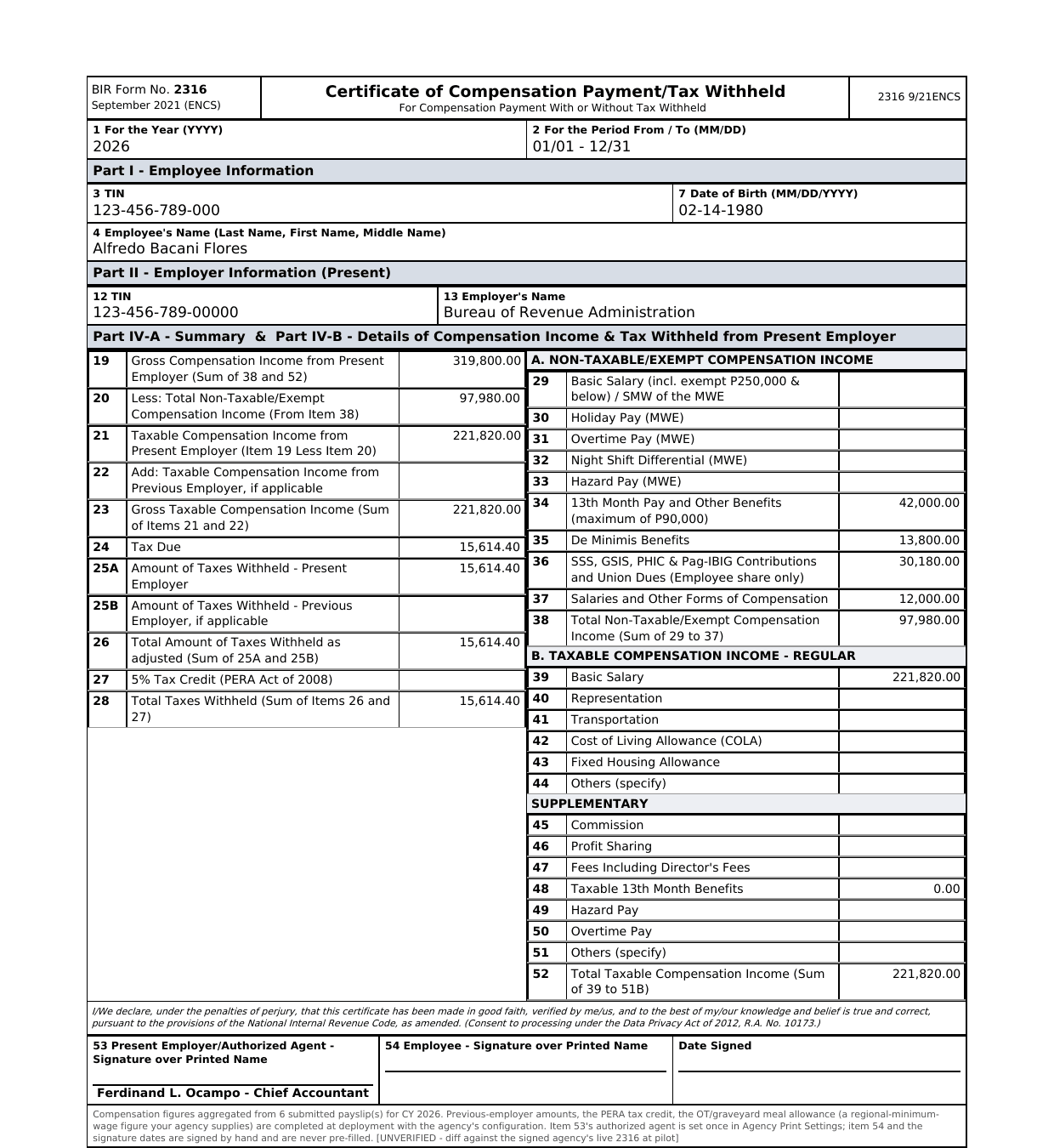
BIR Form 2316
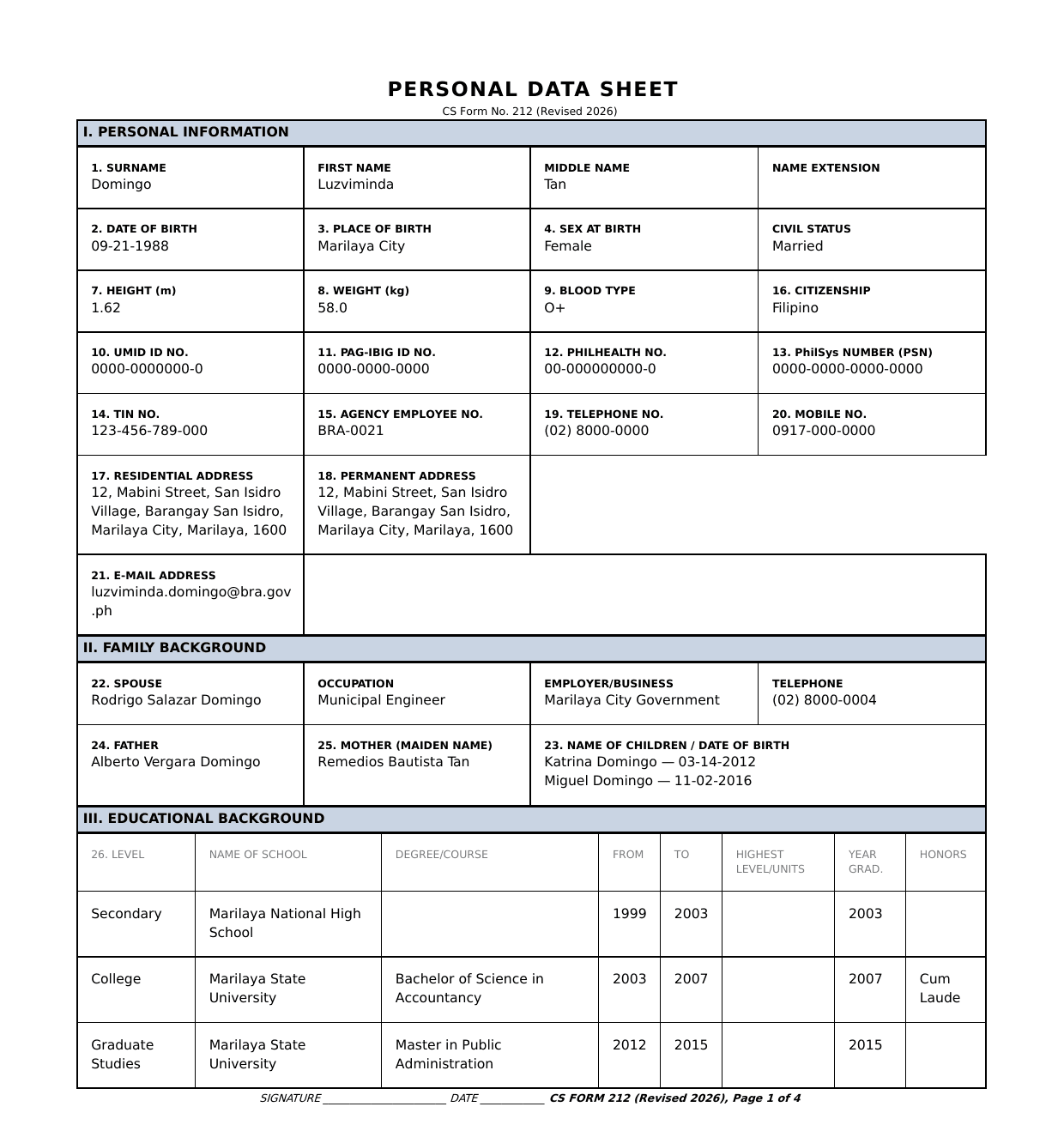
CS Form 212
D1,"1604C", "123-456-789-00000", "0000", 12/31/2026, 1, "", "", "Flores", "Alfredo", "Bacani", "", 0.00, 0.00, 0.00, 0.00, 0.00, 0.00, 0.00, 0.00, 0.00, 0.00, 0.00, , , 0.00, 0.00, 0.00, 0.00, 0.00, 0.00, 97980.00, 0.00, 0.00, 0.00, 221820.00, 221820.00, 221820.00, 15614.40, 0.00, 15614.40, 0.00, 0.00, 15614.40, "", "", "", "", 0.00 1604-C alphalist
A position is a funded item with a number.
This is the distinction that puts plantilla management back in a spreadsheet. Dakila models the item — number, grade, step, authorised salary, Qualification Standards — and reports filled against vacant the way DBM asks for it.
Plantilla
Plantilla
Personal Services Itemization and Plantilla of Personnel
87%
52 of 60 filled
| Item No. | Position title | SG | Step | Authorized Monthly Salary | Office | Status | Incumbent |
|---|---|---|---|---|---|---|---|
| BRA-2026-0001 | Director IV | 28 | 1 | ₱130,000.00 | Office of the Director | Filled | M. Santos |
| BRA-2026-0005 | Division Chief III | 24 | 2 | ₱95,000.00 | Assessment Division | Filled | A. Ocampo |
| BRA-2026-0021 | Supervising Revenue Officer | 22 | 1 | ₱80,000.00 | Collection Division | Filled | L. Domingo |
| BRA-2026-0053 | Revenue Officer II | 15 | 2 | ₱42,000.00 | Assessment Division | Vacant | Vacant |
| BRA-2026-0058 | Computer Maintenance Technologist II | 15 | 1 | ₱42,000.00 | Collection Division | Vacant | Vacant |
On your servers. Administered by us.
Dakila runs inside your agency’s own infrastructure. Employee records, salary data and PDS disclosures stay on hardware you own, behind your own network. There is no vendor cloud holding your personnel files.
Your ICT office does not have to become a Python and MariaDB shop to run it. We deploy it, upgrade it, back it up and stay on call — on your machines.
How it is builtNo egress required
Designed for networks with no internet access at all. Nothing calls out at runtime — not even a font.
Permissions enforced by the server
Every screen is authorised server-side by role. The server decides, on every request.
You keep it, whatever happens to us
The engine underneath is open source under GPL. No licence can be switched off remotely, and the source is yours to hold.
We publish our own findings register.
Every statutory rate is traced to a primary government source before it is allowed into the product. Every place our behaviour differs from stock is written down. Every document the government modules generate has been opened and read by a person rather than passed by a test.
Two reviews so far — one over the screens, one over the files themselves — turned up 16 findings: 14 fixed, two still open, every one published. That includes the one that was a repeat of something we had already fixed once, and the two on the tax figures that our own automated checks passed straight through.
Read the findings register19 modules, walked by hand before we described them.
If you are the one signing for it
What actually changes, without the vocabulary.
The pages above are written for the officer who runs your personnel office. If that is not you, this is the short version of what you are approving.
Year-end stops being a fortnight
The annual tax filings are assembled from payroll that has already run, rather than rebuilt by hand in a spreadsheet in January. The same employee details are entered once and reused wherever a form needs them.
People stop queuing at the personnel counter
Leave, attendance, payslips and certificates are handled from a phone. Your personnel staff decide rather than transcribe, and spend the time on work that needs judgment.
Every change has a name on it
Who altered a record, who approved a request, who exported a report, and when. That trail is what makes an audit a morning rather than a month.
See it running.
A walkthrough runs about half an hour on a fictional bureau with a full plantilla and a live payroll cycle. We change a salary grade in front of you and re-run it. Bring whichever screen you are most sceptical about.
Request a walkthrough